Introduction to game hacking using C & Linux API
This project is part of a presentation I did about the bare and bones of game hacking on Linux.
The goal is to introduce the viewers into two core Linux APIs, namely procfs and ptrace, through
the development of a game trainer.
Disclaimer
Everything discussed and showed in the presentation was done for educational purposes only. I do not encourage or promote the use of cheats or any other method that provide an unfair advantage.
Licence
The project/presentation is licensed under GPLv2. See LICENSE for more information.
Presentation outline
- Introduction to basic concepts (binaries, processes, virtual memory)
- Discussion on common cheating methods (internal, external & hardware level)
- Focus on external cheats and their interaction model with the game's process
- Introduction to Linux'
procfsAPI - Introduction to Linux'
ptraceAPI - Live demo
Demo
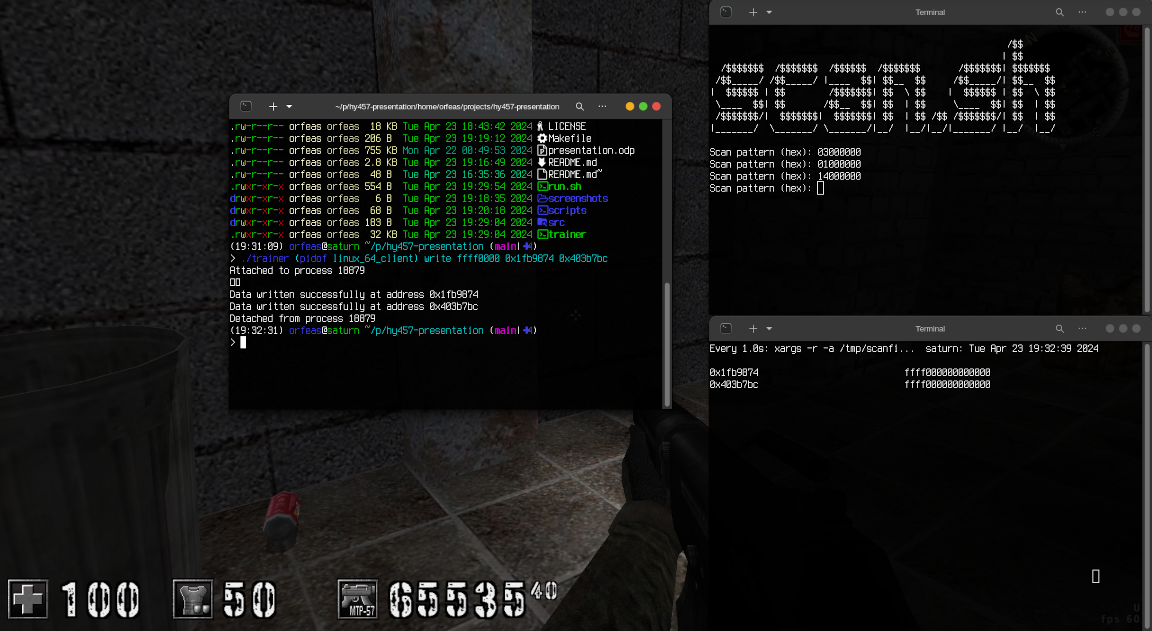
During the demo I went through the steps of making a simple trainer using the concepts explained previously. I did this by going through every single commit which incrementally built the logic for the trainer. Finally I used the game assaultcube to demonstrate the trainer's capability to scan, read and write another process' memory.
Download & Use
Clone the repo
git clone https://git.orfeas.xyz/linux-game-trainer
Prerequisites
In most (if not all Linux distros), ptrace won't be able attach to any process.
To change this behavior you can run:
echo 0 | sudo tee /proc/sys/kernel/yama/ptrace_scope
Note that this setting is not persistent across reboots.
Running the trainer
To run the trainer run:
make
./run <tracee_pid>
Two terminal windows will popup. In case they don't, you can modify the run.sh script to
run your favorite terminal emulator (default being gnome-terminal).
The first terminal window is running the scan.sh found under the scripts/ directory.
The script expects a byte sequence which is then scanned through the tracee's memory. Upon
finishing, the results are cross referenced with previous scans to only get the memory
addresses that have appeared in all scans.
The second terminal window is running the read.sh also found under the scripts/ directory.
The scripts reads out the data of the addresses of the most recent scan (post cross-referencing)
at regular intervals (once per second).
You can write to the remote process' memory by running:
./trainer <tracee_pid> <hex_value> <address ...>
Screenshot